Bryoncarpneter.com was started in September 2009 while I was teaching at Yale Secondary. Since that time my website has been Goomla, Wordpress, blogger.com and now Google Sites.
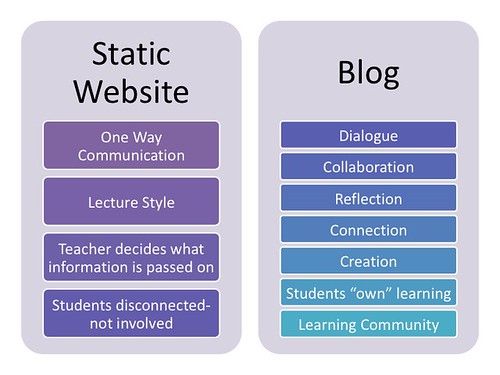
The reason for this site is to test to see which is best for my purpose. Is there one "get myself out there website" that is best? Well that depends. Depends on a number factors from how digitally literate are you (not being condescending by the way), how much work you want to put into posting and what are you reasons for posting. Blogging is a good reason to have a "website" as it can be a public facing journal about something you are learning. There are many reasons people blog which can be found at http://contentmarketinginstitute.com/2010/05/37-reasons-to-blog/.
Website you ask? Are you needing a place to post information that other will need to see, for example, as classroom teacher having a class website? This can be informative but not very dynamic. You could post blog entries on to a website, like I'm doing right now. This can make your site more dynamic as the information has a more up-to-date feel but not necessarily needing to edit pages. Blog post can be posted via email which makes blogging possible from wherever, whenever.
Ultimately your digital footprint is being affected by your online actions. So, choose wisely in what you post and how you post.
Happy New Year 2016. I trust that you had a good Christmas Break and
are refreshed and ready to return to your post. I found this cartoon
hilarious but all to true as it takes energy to reengage after a time of
rest.
New devices, new years resolution and reflection are on our minds as
we start up our classrooms again. It’s a softer start as our students
are already used to our teaching routines since September 2015. But
this softer start may be a time to reflect on how the Fall went for your
classroom (students directly affected by your teaching practice). This
time of reflection is not so that we can beat ourselves up over what
went wrong but to look at what went right and to make the right part
better than before. Don’t be a “No, but…” teacher but be a “Yes,
and…” teacher. Over the next while I will blog about apps and devices for use in
education. This will not be an exhaustive review but a look at how we
use tools for different jobs. As a teaser, consider the hammer. What’s the best hammer for you? Depends…
About Movember. This past month of November I was supportive of those around me who are struggling with the diagnosis of cancer. Movember was started to bring light to men's health issue and particularly prostrate cancer a number of years ago. Since then our awareness of men's cancer issue has increased as men around North America are more cognizant of their vulnerability with respect to prostrate and testicular cancer. I found out at the beginning of November that a friend was diagnosed and another friend's wife was also diagnosed with breast cancer. Hmmm, that'll get a guy thinking about his own health. My story over the past month has been to fast from shaving, not just around my moustache but my whole head. Below is a video about how the hair grew back, in a daily photo blog format.
Now to the details of how I collected the images so that I could effectively do a stop motion animation of or time lapse video of the progress. It's more stop motion in the sense that I didn't stand there all day long but went about my business of being a father, husband, teacher and fisherman but each day returned to the same spot in my kitchen, albeit for one photo, to take a similar photo. I used my iPhone 6 with the forward facing camera set to capture a square image. With the lighting the same as Day 0 I began the 30 Day photo shoot. Once captured to the camera roll, I would open that day's image in MocaDeco which can be used to put text captions on photos. Having setup the template each day I would just upload the picture to the template and change the day number. Exporting the newly captioned picture back to the camera roll, the daily template would be saved. Once in the camera roll Google photos could upload the image to online storage. Once safe and sound there, I could create an animation in Google Photos of each days events to make an animated GIF. This was good for the first while but as the images count increase watching a mute animated GIF got old after the first few pics. I resorted to a video creation app called WeVideo, which is like iMovie but simpler. Rendering the stitched images into a movie with some music created the video below. Another feature of WeVideo which I like is the ability to voice over the music and images. This could be effective for telling a story. Pros of WeVideo on the iPhone 6: easy to use, uploads to WeVideo web service so that you can continue editing your work on a PC or other browser based device. Cons of WeVideo: signin is required which is cumbersome for students but with web-based storage an account is necessary.
That's about all it took to create the stop motion animation of #Movember2015.
Good morning. As we move forward I will work on my blog site bryoncarpenter.com in this new format. I will attempt to move all my recent post to Blogger so that all are in one location. This is experimental right. Thanks for your patience and happy reading.